Virtual data rooms used to be a Wall Street thing. Investment bankers used them to share confidential deal documents during mergers, IPOs, and litigation. The phrase still conjures up oak-paneled conference rooms and four-letter law firm names.
That image is becoming outdated.
Over the past few years, a quieter set of organizations has been adopting the same technology: large U.S. churches and their parent denominations. The reasons aren’t dramatic – there’s no equivalent of an IPO. But the underlying problem is identical. Senior leaders need to share extremely sensitive documents with a small group of outside parties, on tight timelines, with full accountability for who saw what and when. Email and ordinary cloud sharing weren’t built for that.
This post is a vendor-neutral look at why a virtual data room (VDR) belongs in the modern church operations stack, what specifically it solves, and how to evaluate one without getting sold features you don’t need.
What a Virtual Data Room Actually Is
A virtual data room is a secure online repository for confidential documents. The differences between a VDR and a regular shared folder are subtle but important:
- Per-recipient access. You don’t share a folder; you grant a specific person access to specific documents, sometimes for a specific number of hours.
- Built-in expiration. Access has a clock on it. After the deadline, documents simply stop opening.
- Watermarking and download control. Every page can be stamped with the viewer’s name and email so screenshots are traceable. Many sensitive files are view-only – never downloaded at all.
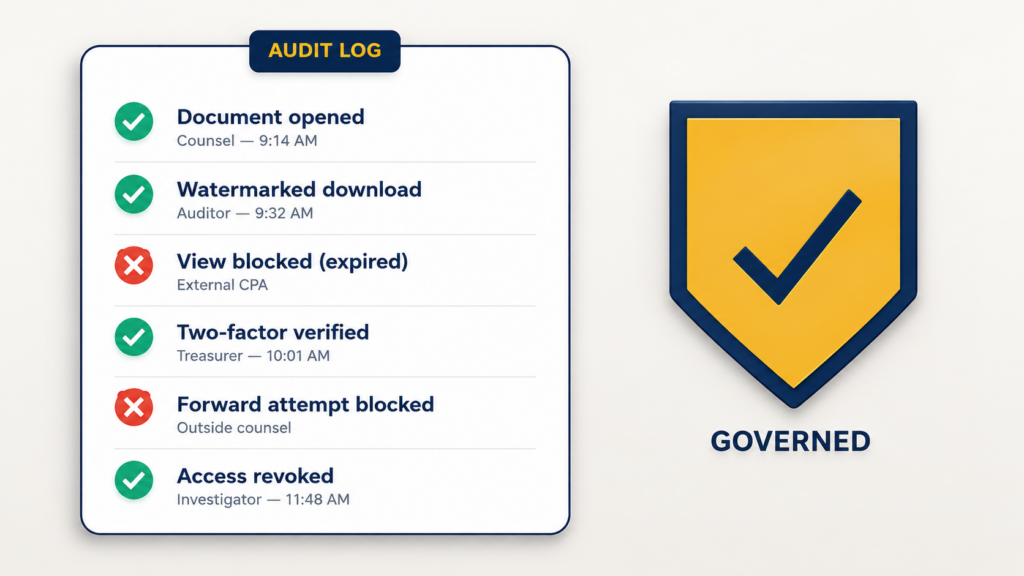
- Detailed audit log. Every open, page view, download, and forward attempt is recorded. You can answer the question “who saw this and when?” months later.
- Granular permissions. “Read-only,” “watermarked-download,” “redacted view,” and “no-print” are first-class settings, not afterthoughts.
In short: a VDR treats every document as a controlled object, not a file in a folder. That distinction is the entire point.
Six Church Scenarios Where VDRs Earn Their Keep
You don’t need a VDR for the bulletin or the small-group sign-up sheet. You need one for the small set of documents that, if leaked or mishandled, would cause real harm – to a person, to the church’s mission, or to its legal standing. Six scenarios come up repeatedly.
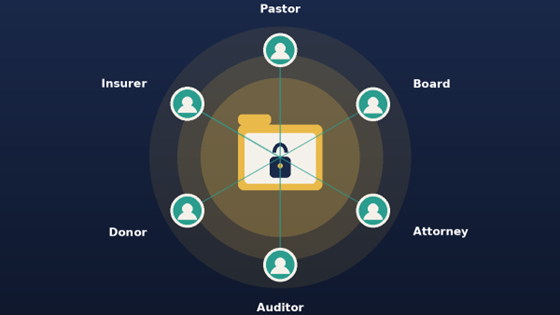
1. Clergy and staff misconduct investigations. When a church engages outside counsel, an HR investigator, or a denomination’s review body, a defined set of files needs to be shared with a defined set of people, often under confidentiality terms. Email is the wrong channel. A VDR gives the investigation a sealed, auditable workspace and a clean way to revoke access at the end.
2. Major-donor and planned-giving conversations. Estate attorneys, family-office advisors, and CPAs frequently ask for financial disclosures, audited statements, and program documentation before a multi-million-dollar gift closes. Sending those as email attachments is both unprofessional and risky. A VDR turns it into the same controlled experience a private bank or family office would expect.
3. Property transactions, mergers, and parish reorganizations. Selling a building, merging two congregations, or restructuring a multi-site network looks a lot like a small M&A deal. Title documents, appraisals, environmental reports, financials, and board resolutions all need to flow to attorneys, lenders, insurers, and counterparties – without ending up in personal Gmail.
4. Board, audit, and finance committee distribution. Board packets often include personnel matters, executive compensation, legal updates, and discipline issues. Most “board portal” software is overkill for a church and ignored after a quarter or two. A lightweight VDR that mirrors how the board already works – but with watermarks and expiration – is usually a better fit. Many churches follow governance frameworks such as ECFA (Evangelical Council for Financial Accountability) governance guidance to ensure financial transparency and accountability.
5. External audit and 990 preparation. Outside CPAs, denominational auditors, and insurance underwriters frequently need access to financial records, payroll detail, and program data for limited windows. A VDR makes that “limited window” literal – access opens, audit happens, access closes.
6. Insurance, litigation, and abuse-claim files. Few categories of documents are more sensitive than abuse-claim records, victim impact statements, and related correspondence. These files require defensible, court-quality handling: who accessed what, when, and from where. A VDR with a real audit trail is the only credible answer. Best practices from “Church Law & Tax” emphasize strict control over sensitive documents and clear audit trails.
What “Good” Looks Like
When churches evaluate VDR options, the marketing pages all look identical. The features that actually matter in the field tend to be the unglamorous ones:
- An audit log a non-technical person can read. If the executive pastor can’t pull a clean access report on demand, the audit log isn’t doing its job.
- Time-boxed access by default. New shares should expire automatically. Indefinite access is how leaks happen.
- Per-document watermarking with the viewer’s identity. Not the recipient’s email address as a placeholder – the actual person, dynamically applied.
- Single sign-on for staff, simple guest access for outsiders. The pastor and board chair shouldn’t have to learn another password. The outside attorney shouldn’t have to install anything.
- Mobile-respectful, but not mobile-permissive. Viewable on a phone, yes. Downloadable to a phone, only when explicitly allowed.
- A clear “close the room” workflow. When the investigation, the deal, or the audit ends, there’s a single defined action that revokes everything and archives the log.
Where It Fits in the Microsoft 365 Stack
Most large churches already run on Microsoft 365 – Teams, SharePoint, OneDrive, Exchange. The good news is that you don’t need to add a parallel platform; the controls you need can sit on top of what you already have.
Govern 365 is the platform we build at Netwoven for exactly this scenario – secure rooms, expiration, watermarking, and full audit trails layered into the M365 tenant a church already runs, governed by Microsoft Purview and Entra. We mention it here because the integration story matters: a VDR that lives outside your tenant means another vendor, another set of credentials, and another place files could leak. A VDR that lives inside it doesn’t.
That said, the principles in this article apply regardless of vendor. The question is whether your church has a defined, controlled way to share its most sensitive documents with the people who legitimately need them – and a clear, defensible record of having done so.
VDR Savings Calculator
A smarter way to manage sensitive data. Move your VDR inside your own tenant and stop the vendor cloud leak.
Based on 2026 Subscription model.
Where to Start
If your church doesn’t have a VDR motion today, you don’t need to buy software tomorrow. Start with three questions:
That’s your real list. It’s almost never as long as people think.
Email attachments, a shared OneDrive folder, a USB stick, a paper packet at the board meeting? Map the actual workflow, not the policy.
If the honest answer is “it doesn’t, really,” that gap is your starting point.
A virtual data room is, in the end, a fairly mundane piece of technology. What it actually delivers is something more important – a credible answer to the question every church will eventually be asked: “Who had access to this, and how do we know?” That answer is worth far more than the software costs.
Key Takeaways
- Virtual data rooms for churches provide secure document sharing with controlled access, essential for confidentiality.
- VDRs excel in scenarios like misconduct investigations, donor relations, and property transactions, facilitating sensitive document handling.
- Key features of a VDR include per-recipient access, built-in expiration, audit logs, and granular permissions.
- Microsoft 365 users can integrate VDRs within their existing setup, enhancing security without adding complexity.
- To implement a VDR, churches should identify sensitive documents, assess current sharing methods, and define access revocation processes.