When a deal reaches the table – an acquisition, a fundraise, an IP licensing round, or an external audit – the tool you use to share confidential documents can protect the deal or quietly put it at risk. That is why virtual data rooms have become the default for finance, legal, and compliance teams. But the market is crowded: dozens of data room providers all claim to be the most secure, the most affordable, and the most AI-ready. This guide compares the best virtual data room providers of 2026 on the things that actually decide a deal – features, security architecture, and one question most buyers ask too late: where does your data actually live?
What is a virtual data room?
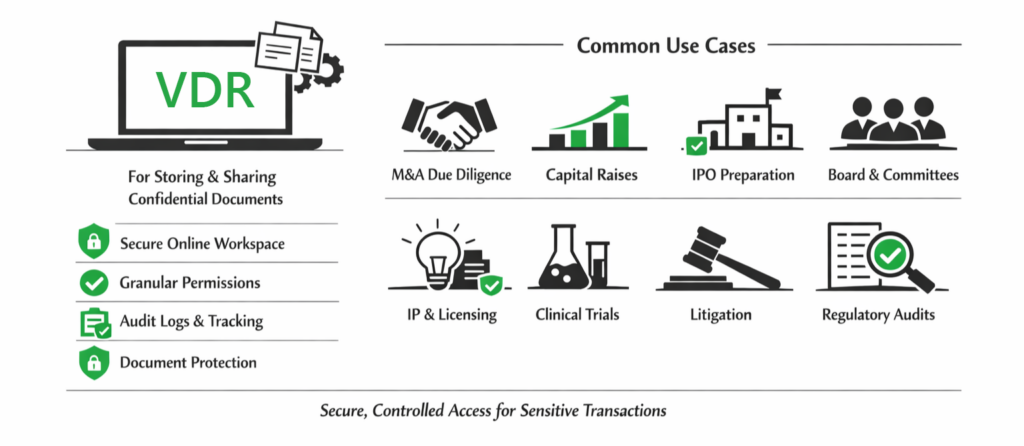
A virtual data room (VDR) is a secure workspace built for storing and sharing confidential documents during high-stakes transactions. Unlike consumer file-sharing tools, a VDR adds granular permissions, dynamic watermarks, audit logs, document expiry, and viewer-level activity tracking. The use cases are wide – M&A due diligence, capital raises, IPO prep, board work, IP licensing, litigation and legal review, and regulatory audits – anywhere a third party must review sensitive material and you need a verifiable record of who saw what, when.
What to look for in a virtual data room provider
Marketing pages list similar features. The ones that separate strong VDR providers from weak ones during a real deal are these:
- Granular permissions – per-document and per-user control: view-only, watermarked-view, download, or print, set individually.
- Audit trails and analytics – page-level engagement data, not just “who opened the file,” which is a real edge during fundraising and M&A.
- Q&A workflows – native question management with assignment, threading, and approval routing so diligence doesn’t collapse into email.
- Security architecture – SOC 2, ISO 27001, GDPR and HIPAA where relevant, encryption in transit and at rest, MFA, and dynamic watermarking that embeds viewer identity.
- Setup speed and bulk indexing – how fast you can provision a room and search across thousands of files.
VDR providers compared: the 2026 landscape
| Provider | Deployment model | Best for | Security architecture | M365-native |
| Govern 365 | Tenant-native (runs inside your Microsoft 365) | M365 deal teams; multi-deal portfolios | Inherits Entra ID + Purview; data never leaves your tenant | Yes |
| Datasite | Third-party SaaS | Large-cap M&A at investment banks | Enterprise DRM, vendor-hosted | No |
| Intralinks | Third-party SaaS | IB, IPO, structured finance | Enterprise, vendor-hosted | No |
| iDeals | Third-party SaaS | Mid-market M&A, corporate development | Standard VDR security, hosted | No |
| Firmex | Third-party SaaS | Time-boxed deals, legal practice | Standard VDR security, hosted | No |
| ShareVault | Third-party SaaS | Life sciences licensing, biotech | Standard VDR security, hosted | No |
Legacy platforms like Datasite and Intralinks remain strong for the largest one-off transactions. Mid-market and repeat dealmakers often weigh iDeals, Firmex, and ShareVault. For Microsoft 365 organizations running recurring secure-collaboration cycles, a tenant-native option changes the math – which brings us to the question most buyers skip.
The question most buyers skip: where does your data live?
Almost every traditional VDR is third-party SaaS: your sensitive documents leave your environment and live on the provider’s infrastructure for the life of the deal. For a one-time transaction, that trade-off is often fine. But for organizations collaborating securely all the time – export-controlled engineering, recurring board and audit cycles, ongoing IP licensing – sending data out every time creates duplicated identity systems, inconsistent retention, separate audit trails, and a per-deal cost stack.
This is where tenant-native data rooms are gaining ground. Rather than copying documents out to a third-party VDR, the room is provisioned inside your existing Microsoft 365 tenant. Files stay where they already live; the identity, sensitivity labels, and retention policies you already run carry over automatically; and the audit trail lands in the same Purview environment your security team already monitors. Govern 365, built by Netwoven on Microsoft 365, is the leading example – one governance backbone across compliance, secure collaboration, and the virtual data room, without ever moving documents out of your tenant.
Best data room by use case and industry
The best fit depends on the work. A few patterns hold across most data room comparisons:
- Best data room for M&A and IPOs – legacy platforms lead the largest one-off deals; tenant-native fits recurring M&A due diligence.
- Best data room for private equity – funds running multiple deals a year favor flat-rate, reusable rooms. See the private equity data room.
- Best data room for legal teams – matter-based access and audit trails. See the legal data room.
- Best data room for real estate – transaction and asset-level document control. See the real estate data room.
- Best data room for life sciences – licensing and clinical partnerships under compliance. See the life sciences data room.
How to run a virtual data room comparison
A useful comparison starts with your deal pattern, not the vendor list. Map how often you’ll run secure-collaboration cycles, how many documents and counterparties per cycle, which certifications matter, and what tools the platform must integrate with. Then narrow to three or four contenders and test each with a representative sample: time the setup, invite a teammate as a “buyer,” and run a fake diligence cycle. Twenty minutes of hands-on testing reveals more than any feature matrix – especially whether your existing Microsoft 365 governance carries over or you’re rebuilding it inside a new platform.
Best data room providers: frequently asked questions
The leading virtual data room providers in 2026 include Govern 365 (Microsoft 365-native), Datasite and Intralinks (enterprise M&A), iDeals and Firmex (mid-market), and ShareVault (life sciences). The best choice depends on deal frequency, security requirements, and whether your data should stay inside your own Microsoft 365 tenant.
There is no single best VDR – the right one matches the shape of your work. For one-off large transactions, established third-party platforms deliver. For organizations with recurring secure-collaboration needs already standardized on Microsoft 365, a tenant-native VDR like Govern 365 removes the duplicate-governance cost of bolting an external room onto every program.
A data room provider supplies the platform; a virtual data room service typically bundles the platform with setup, administration, and support. Tenant-native providers blur the line by delivering the room inside infrastructure you already own and manage.
Pricing ranges from around $2,400 per year for flat-rate plans to six figures per deal for enterprise per-page contracts. See the full virtual data room pricing guide for a model-by-model comparison, or run the cost calculator.
Choosing the right provider
The right virtual data room is the one that matches the full pattern of sensitive collaboration your teams run year after year, not just the next deal. For one-off transactions, established third-party platforms still deliver. For organizations already standardized on Microsoft 365, a tenant-native VDR removes the duplicate-governance tax of an external room. Request a Govern 365 walkthrough and we’ll map it to your environment.