Lifecycle Management
Stop Waiting on IT. Start Your Deal Today.From deal kickoff to archive - spin up a data room in minutes, run it with pre-built templates, onboard bidders and auditors without new accounts, and close out cleanly when the deal ends. Every stage runs inside your Microsoft 365 tenant. No IT tickets. No vendor-side setup fees. No archive charges at close.
Request a DemoInstant Deployment. Automated Disposition.
- Self-Service Data Room Provisioning & Instant Setup: Create production-ready virtual data rooms in minutes without IT. Provision secure deal spaces with built-in access controls, audit logging, and compliance settings automatically enforced - no tickets, no delays, no setup fees.
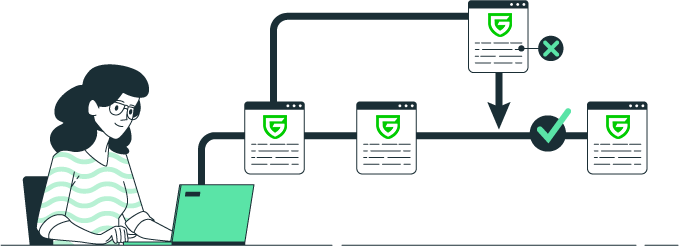
- Industry Templates & Deal-Specific Approval Workflows: Launch with purpose-built templates for M&A, due diligence, bidding, and audits. Multi-level approvals ensure proper authorization while maintaining complete audit trails - no manual coordination, instant participant onboarding.
- Automated Data Room Archival & Clean Disposition: When deals close, your data room automatically archives and securely disposes of sensitive information. Zero cleanup work. Zero surprise charges. Compliance-certified destruction with complete audit documentation.
Deal teams at Quifa, Airna, and Glycos use Govern 365 to launch new rooms in minutes — not days.




What is Lifecycle Management?
Launch secure virtual data rooms in minutes – without waiting for IT. Our lifecycle management solution empowers business teams to set up deal spaces instantly, onboard bidders and auditors immediately, run the entire deal process within your Microsoft 365 tenant, and close out cleanly when the deal ends. No IT tickets. No vendor setup fees. No surprise archive charges. Everything you need to manage sensitive deal data from kickoff to completion.
Why It Matters
IT bottlenecks slow deal timelines when business teams need immediate VDR access.
Vendor lock-in and hidden fees for setup, external user licensing, and archive charges.
Deployment delays from complex configurations, external hosting requirements, and integration needs.
Compliance gaps when data rooms lack proper audit trails and automated lifecycle management.
Manual cleanup and extended vendor charges even after deals close.
Data sprawl across multiple VDR vendors with inconsistent governance and retention policies.
What’s inside Lifecycle Management
Three capabilities that work together to give you a defensible record of every deal – from first access to final disposition.


Self-Service Provisioning – New Rooms in Minutes
Authorized users create a new deal room from a templated structure in a few clicks – no IT ticket, no vendor handoff, no waiting period. The room is provisioned inside your Microsoft 365 tenant with the right folder structure, permissions, sensitivity labels, and policies already configured. Deal leads go from “we got the signed term sheet” to “live data room with bidders invited” in under an hour, not three days.
- Wizard-based creation flow accessible to any authorized business user
- Approval workflow routes requests to Legal, Compliance, or IT automatically
- Provisions in minutes, not days – no vendor-side setup, no integration projects
- Each room is a SharePoint site under the hood – familiar to IT, compatible with existing governance
- Cost scales with VDR count, not per provisioning event – unlimited provisioning on every edition

Industry Templates – Pre-configured for the Deal you’re Running
Instead of starting with a blank room, pick a template built for your industry and deal type. An M&A template has the standard folder structure (Financials, Legal, HR, IP, Operations), default permissions for buy-side and sell-side teams, and retention rules pre-configured. A capital raise template, a board reporting template, and an audit coordination template each carry the same pre-applied structure for their specific purpose. Your team stops reinventing deal rooms and starts running them.
- Pre-built templates for M&A, capital raise, board reporting, supplier collaboration, life sciences submissions
- Each template carries folder structure, default permissions, watermark policy, and retention rules
- Customers build custom templates from rooms they’ve already run successfully
- Template library updates roll out centrally – every new room benefits without customer IT work
- Templates respect the tenant’s existing Microsoft Purview policies
External Onboarding – Invite without New Accounts
External bidders, auditors, and investors get access to a VDR using their own corporate Microsoft identity through Microsoft Entra ID B2B. No new accounts to create on your side. No new passwords for them to manage. No per-user licensing fees. For guests whose organizations block cross-tenant sharing or who don’t have Microsoft identities, the Vault portal provides brokered access that also requires no Microsoft license. The bulk invitation engine handles hundreds of guests with permission assignment in a single operation.
- Entra ID B2B handles guests with Microsoft corporate identities (typically 80-90% of external users)
- Vault portal handles guests without Microsoft identities or with tenant restrictions
- Bulk invitations with per-group permission assignment
- MFA and conditional access enforced automatically via tenant policy
- Onboarding activity captured in the audit trail for post-deal defensibility

Automated Archival – Clean Closeout, No Data Exfiltration
When a deal closes, rooms don’t need to be “archived out” to a vendor’s cold storage for a fee – the data already lives in your Microsoft 365 tenant. Archival is a state change, not a data migration. The room locks against further changes while preserving read access for designated parties. A deal bible snapshot captures every document, every Q&A thread, every activity log as a permanent record. Retention policies take over for long-term disposition. No vendor-side “archive access fees.” No CDs mailed in boxes.
- Lock the room against edits while preserving read access for designated parties
- Automatic deal bible snapshot of content, Q&A, and activity logs
- Hand off to retention and disposition policies defined in Microsoft Purview
- No archive access fees – the data stays where it always was
- Workspace sprawl prevention through automatic expiry notifications to owners
Backed by Microsoft 365 and SharePoint
Every VDR provisioned through Govern 365 is a SharePoint Online site under the hood. Your IT team already knows how to manage SharePoint. Your backup and disaster recovery policies already cover it. Your existing Microsoft 365 license entitlements apply – no parallel storage contract, no per-GB overages, no vendor-side infrastructure to vet for your next security audit. Provisioning simply configures what’s already licensed. Templates, permissions, and sensitivity labels are the same constructs your tenant already uses.
- Every VDR is a SharePoint Online site with Govern 365 governance applied
- Existing backup, DR, and disaster recovery policies extend to VDR content
- Microsoft 365 storage entitlements apply – no separate data contract
- Compatible with existing Microsoft Purview sensitivity labels and retention policies
- No third-party infrastructure for your security team to review

Frequently Asked Questions
Minutes, not days. Self-service provisioning launches a fully configured VDR from an industry template — folder structure, default permissions, watermark policy, sensitivity labels, and retention rules already in place. Business users spin up rooms without IT tickets, vendor handoffs, or manual setup calls. Most customers go from deal approval to live VDR in under an hour. Legacy VDRs typically require 24-72 hours and a vendor-side project manager per room.
M&A due diligence, capital raise, board reporting, supply chain and supplier collaboration, life sciences and pharma submissions, energy and infrastructure deals, manufacturing data sharing, and real estate transactions. Each template carries the standard folder structure, default permissions, watermark policy, and retention rules for that deal type. Customers on higher editions can also create their own custom templates from rooms they’ve already run — useful when your deal patterns don’t match the standard set.
Yes. Templates are a starting point, not a straitjacket. Every element — folder structure, permissions, watermark policy, retention rules — is editable once the room is provisioned. Customers typically customize the template once, save the customized version as their own reusable template, and reuse it across similar deals. Template changes don’t affect already-provisioned rooms unless you explicitly roll the update out.
No. External guests authenticate through Microsoft Entra ID B2B with their own corporate identity — no new accounts, no new passwords, no Microsoft 365 license cost on your side. Guests without Microsoft identities or from organizations that block cross-tenant sharing get access through the Vault portal, which also requires no Microsoft license.
Archival locks the room against edits while preserving read access for designated parties (legal counsel, compliance reviewers, the deal team). A deal bible snapshot captures every document, Q&A thread, and activity log as a permanent record. Then your retention policy takes over for long-term disposition — archive, hold for discovery, or dispose with certificate. Unlike legacy VDRs, there’s no “archive access fee” or data migration — the content already lives in your Microsoft 365 tenant.
Archiving locks the room but preserves its content and audit trail for read access by designated parties. Deletion removes the content permanently under your retention policy and generates a cryptographically signed certificate of destruction documenting what was disposed and when. Most deals archive at close (in case of post-deal disputes or discovery) and dispose at the end of the retention period — typically seven years for regulated industries.
Automatic expiry triggers notify owners when a project is nearing its end, giving them a choice to archive, extend, or dispose. Rooms that are neither recertified nor extended follow the default retention policy automatically. Tenant-wide dashboards surface every active workspace across the organization so IT can identify stale rooms, unknown owners, or abandoned projects before they become compliance liabilities. Most customers see significant reduction in uncontrolled SharePoint sites within 90 days of deployment.
Active VDR count is the primary pricing variable. Founder Edition covers 1 VDR, Team covers 5, Growth covers 15, Corporate covers 35, and Enterprise is unlimited. Users and storage are unlimited on every edition — only the count of active rooms scales with edition. Archived rooms don’t count against your active limit, which matters for customers running sequential deals over a long time horizon.
Yes. Authorized business users — typically deal leads, legal counsel, M&A directors — can provision rooms directly through the Govern 365 dashboard without needing Microsoft 365 admin rights. The approval workflow routes requests to Legal, Compliance, or IT based on your policy, so self-service doesn’t mean unsupervised. IT defines who can provision and under what conditions; business users operate within those guardrails at self-service speed.
Self-service provisioning, industry templates, external onboarding, and archival are included in every edition starting with Founder at $2,400/year. Advanced features scale with edition — approval workflows on Team and up, custom templates on Growth and up, cross-tenant provisioning governance on Corporate and Enterprise.
Insights | Testimonial


Insights | Blog