TABLE OF CONTENTS
- Introduction
- Why Consider SharePoint as a Virtual Data Room
- Advantages of SharePoint as a Virtual Data Room
- The Limitations You Need to Be Aware Of
- Where Govern 365 Adds the Missing Intelligence
- SharePoint Alone vs. SharePoint with Govern 365
- Conclusion
EXPLORE MORE
- Capital Fundraise (4)
- Compliance (11)
- Life Science (4)
- M&A (16)
- Non-Profits (2)
- Private Equity (1)
- Secure Collaboration (16)
- Virtual Data Room (65)
Can SharePoint be used as a Virtual Data Room?
Yes, SharePoint can be configured as a Virtual Data Room (VDR) using Microsoft 365 features such as permissions, audit logs, and information protection. However, it requires manual setup and lacks some advanced VDR capabilities like Q&A workflows and analytics.
When businesses talk about a Virtual Data Room (VDR), the first things that come to mind are secure file storage, controlled sharing, and easy collaboration for sensitive projects like mergers, audits, or fundraising. Traditionally, VDRs are offered by specialized vendors. Here’s the key insight: if your organization already uses Microsoft 365, you may already have the foundation for a virtual data room in SharePoint.
Why Consider SharePoint as a Virtual Data Room?
At its core, SharePoint is a content management and collaboration platform. It’s designed for secure document storage, controlled sharing, and teamwork. With the right configuration, SharePoint can be tailored into a secure virtual data room for deals, audits, compliance projects, or any scenario requiring confidential document exchange. SharePoint wasn’t originally marketed as a virtual data room, but it has the essential DNA:
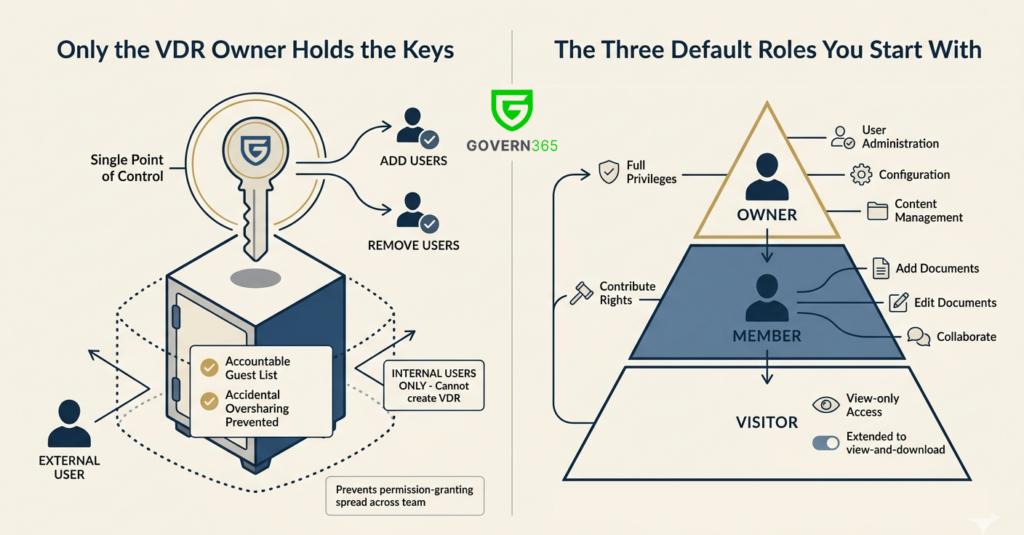
- Dedicated project sites can be created for each transaction or audit.
- Granular permissions let you define exactly who has access to what.
- Audit trails and version history track every action taken on a document.
- Information protection policies can encrypt files, prevent forwarding, or even apply watermarks.
- Microsoft Teams integration ties conversations directly to shared documents.
With the right configuration, SharePoint can provide the secure and collaborative environment a data room demands.
When Should You Use SharePoint as a Virtual Data Room?
SharePoint works well for internal collaboration, smaller projects, and cases where your organization already has strong Microsoft 365 governance. However, for high-stakes scenarios like M&A, fundraising, or audits, a governed solution such as a Microsoft 365-native virtual data room is recommended.
Advantages of Using SharePoint as a Virtual Data Room
- Cost-effective – If you already own Microsoft 365, there’s no additional license fee.
- Secure by design – Backed by Microsoft’s enterprise-grade security infrastructure.
- Familiar user experience – Employees already know how to work with Office apps.
- Strong collaboration – Real-time co-authoring and seamless Teams integration.
- Scalable – Equally effective for a small investor portal or a large global project.
Limitations of Using SharePoint as a Virtual Data Room
Yet, SharePoint is not a perfect replacement for a specialized VDR.
- Complex to configure – Permissions and governance require expertise and constant oversight.
- Missing advanced VDR features – Built-in Q&A workflows, redaction, or analytics dashboards aren’t available.
- Guest user friction – External stakeholders may face login hurdles.
- Compliance requirements – Some industries or regulators may still expect a certified VDR solution.
Put simply: SharePoint is a toolbox with everything you need, but it is not automatically assembled for enterprise use cases.



Govern 365 has streamlined our workflow, allowing secure collaboration and fast sharing of sensitive files with external partners. Its flexibility, clear pricing, and integration with SharePoint make it an ideal solution for our business needs.
Alex Friend
Head of Business Intelligence & IT
How Much Can You Save by Using a SharePoint-Based VDR?
While SharePoint offers a cost advantage over traditional virtual data room providers, the real savings depend on your usage. Use the calculator below to estimate your potential cost savings with Govern 365.
VDR Savings Calculator
Based on 2026 Subscription Pricing
Typical industry average: $5k – $20k
No commitment required • Free Technical Assessment
Where Govern 365 Adds the Missing Intelligence
This is where Govern 365 steps in. It doesn’t replace SharePoint - it elevates it. By layering automation and governance on top of Microsoft 365, Govern 365 turns SharePoint into a ready-to-go virtual data room that meets business needs without administrative complexity.
Why Govern 365 Is a Smarter Choice
- One-click provisioning – Launch a fully secure and compliant data room instantly.
- Automated governance – Permissions, sharing, and retention policies are applied consistently, without human error.
- Simplified external collaboration – External users get the right level of access without IT firefighting.
- Audit-ready reports – Generate compliance documentation instantly, with clear visibility of activity.
- Risk protection – Prevent oversharing and accidental data leaks before they happen.
- Native Microsoft environment – All content stays within your Microsoft 365 tenant.
SharePoint Alone vs. SharePoint with Govern 365
To better understand the difference between a manually configured SharePoint setup and a fully governed virtual data room, here’s a side-by-side comparison:
| Feature | SharePoint Alone | With Govern 365 |
|---|---|---|
| Setup | Manual, IT-heavy | Automated, one-click |
| External Sharing | Functional but clunky | Smooth and reliable |
| Compliance | Requires ongoing effort | Audit-ready by design |
| Security | Strong but admin-dependent | Guardrails reduce human error |
| User Experience | Familiar but inconsistent | Streamlined and professional |
Download VDR Whitepaper
Stop spending on purchasing expensive Virtual Data Room (VDR) solutions. Use Govern 365 to quickly create Microsoft 365 data rooms or SharePoint online data rooms.
Conclusion
SharePoint can absolutely function as a virtual data room. For many organizations, it’s a secure, cost-efficient option that fits naturally into the Microsoft 365 ecosystem.
But if the goal is to reduce friction, ensure compliance, and provide a polished experience for both internal teams and external stakeholders, then Govern 365 is the smarter choice.
Think of it this way
- SharePoint gives you the engine.
- Govern 365 makes it road-ready.
Together, they deliver a virtual data room that is not just functional, but reliable, compliant, and business-ready.
👉 Schedule a demo of Govern 365 to see how you can transform SharePoint into a secure, compliant virtual data room inside Microsoft 365.
Frequently Asked Questions
Yes, SharePoint can be configured as a virtual data room (VDR) using Microsoft 365 features such as permissions, audit logs, and data protection policies. However, it requires manual setup and lacks built-in VDR workflows like Q&A, analytics, and automated governance.
SharePoint offers cost efficiency, strong security backed by Microsoft, familiar user experience, and seamless integration with Microsoft 365 tools like Teams and OneDrive.
SharePoint requires manual configuration, lacks advanced VDR features such as structured Q&A workflows and deal analytics, and can introduce complexity in managing permissions and external access.
Traditional VDRs provide pre-built workflows, advanced security controls, and better external user experience, while SharePoint offers flexibility and lower cost but requires additional setup and governance.
Govern 365 transforms SharePoint into a fully governed virtual data room by adding automation, compliance controls, audit readiness, and secure external collaboration features within Microsoft 365.
Yes, SharePoint is secure when configured correctly with Microsoft 365 security features such as encryption, access controls, and audit logs. However, misconfigurations and lack of governance can increase risk.