Is SharePoint a Virtual Data Room?
Short answer: No, SharePoint is not a virtual data room out of the box. SharePoint Online is a Microsoft 365 content collaboration platform with the secure storage, identity, and compliance foundation a virtual data room (VDR) needs – but it is missing the deal-specific workflows (Q&A, dynamic watermarking, document numbering, closing bible exports) that purpose-built VDRs ship with by default. SharePoint can be turned into a VDR with the right governance layer on top.
That is the headline. The detail is more useful, because “configure SharePoint to act as a VDR” is a sentence that hides about thirty hours of admin work and about eight capability gaps. Here is the honest version.
What counts as a virtual data room?
A virtual data room is a secure online workspace used to share confidential documents during high-stakes transactions – M&A due diligence, capital fundraising, audits, board reviews, IP licensing, supply-chain qualification.
A real VDR differs from generic file sharing in five ways:
- Granular per-document and per-user access control
- Activity audit logging with deal-context reporting
- Dynamic watermarking and DRM
- A structured Q&A workflow for bidders, auditors, or investors
- Lifecycle controls – expiration, archival, and a packaged closing record
Any of those missing, and what you have is collaboration software, not a data room.
What does SharePoint provide natively?
SharePoint Online ships with the foundational building blocks of a VDR:
- Encrypted document storage in your Microsoft 365 tenant
- Granular permissions at site, library, folder, and item level
- Entra ID identity with conditional access, MFA, and B2B guest invitations
- Microsoft Purview sensitivity labels, DLP, retention, and eDiscovery
- Versioning and activity audit logs
- A familiar Office user experience for external users
For everyday confidential collaboration – sharing financials with an auditor, exchanging files with a single partner, hosting a quarterly board pack – SharePoint alone is often the right answer. The infrastructure is enterprise-grade, the cost is sunk into your existing Microsoft 365 licensing, and external users do not have to learn a new vendor portal.
What is SharePoint missing as a VDR?
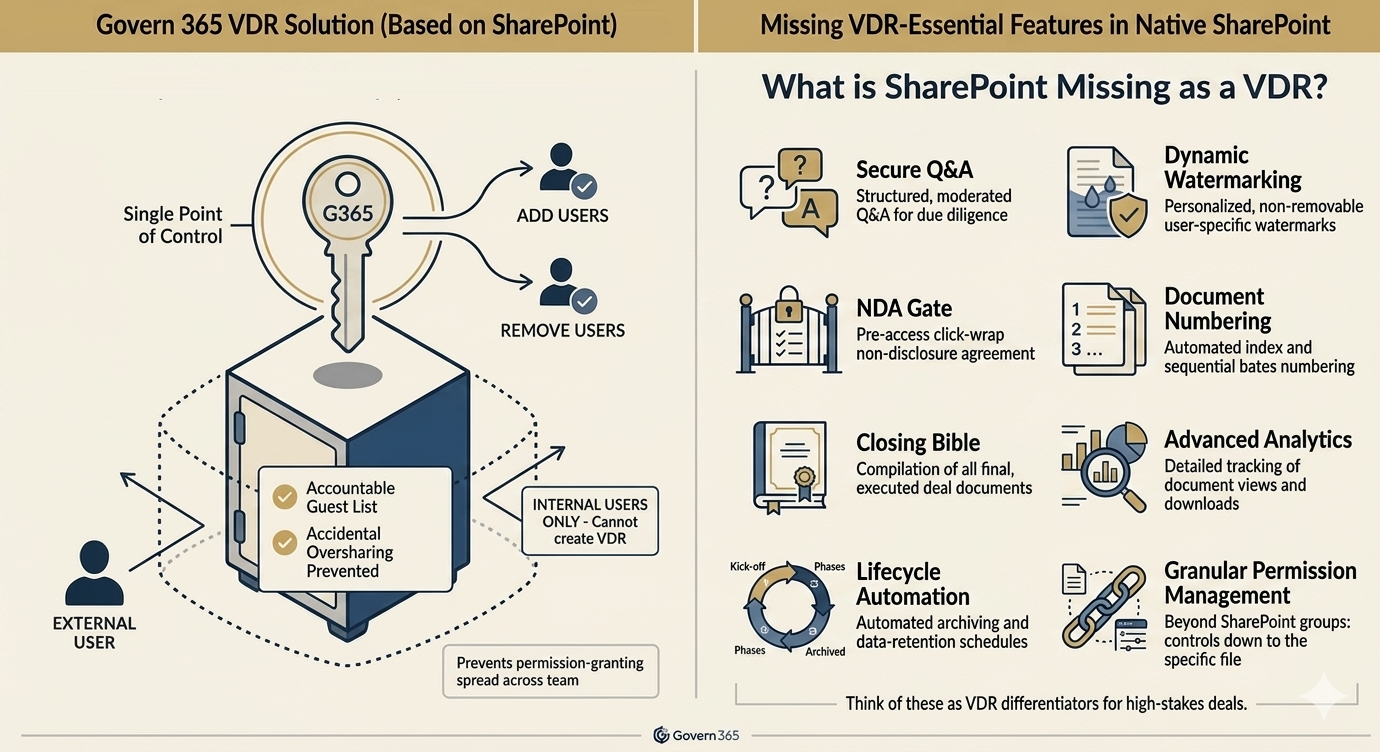
Eight gaps separate raw SharePoint from a transaction-grade VDR:
- No structured Q&A workflow. SharePoint has no built-in way for bidders to ask questions, route them to subject-matter experts, log answers, and timestamp the exchange for the closing record.
- No dynamic watermarking. SharePoint does not stamp viewer email, IP address, and timestamp on every page of every document. Sensitivity-label banners are static classification markers and not the same thing.
- No deal document numbering. Deal teams need stable index numbers (1.2.3.4) that survive uploads, deletions, and reorganization. SharePoint orders by filename or modification date.
- No NDA acceptance gate. SharePoint does not require an NDA click-through before document access.
- No closing bible export. Closing a deal requires a complete, packaged record of every document, every Q&A thread, and every audit event – exported in one shot. SharePoint cannot assemble this natively.
- Permission complexity at scale. Multi-bidder M&A auctions need separate, watertight permission lanes per bidder. SharePoint’s combination of site groups, library, folder, and item permissions becomes unmanageable past about three external parties.
- No bidder engagement analytics. SharePoint logs file opens, but not per-page dwell time. Founders and deal teams cannot see which pages investors or bidders actually engaged with.
- No room lifecycle automation. Spinning up a new deal room – permissions, folder taxonomy, sensitivity labels, watermarking, retention – is manual SharePoint admin work for every transaction.
Those eight gaps are exactly where deals get messy. Permission errors leak documents to the wrong bidder. Missing Q&A history breaks the closing record. No watermarking, no NDA, no defensible audit trail.
How do you turn SharePoint into a virtual data room?
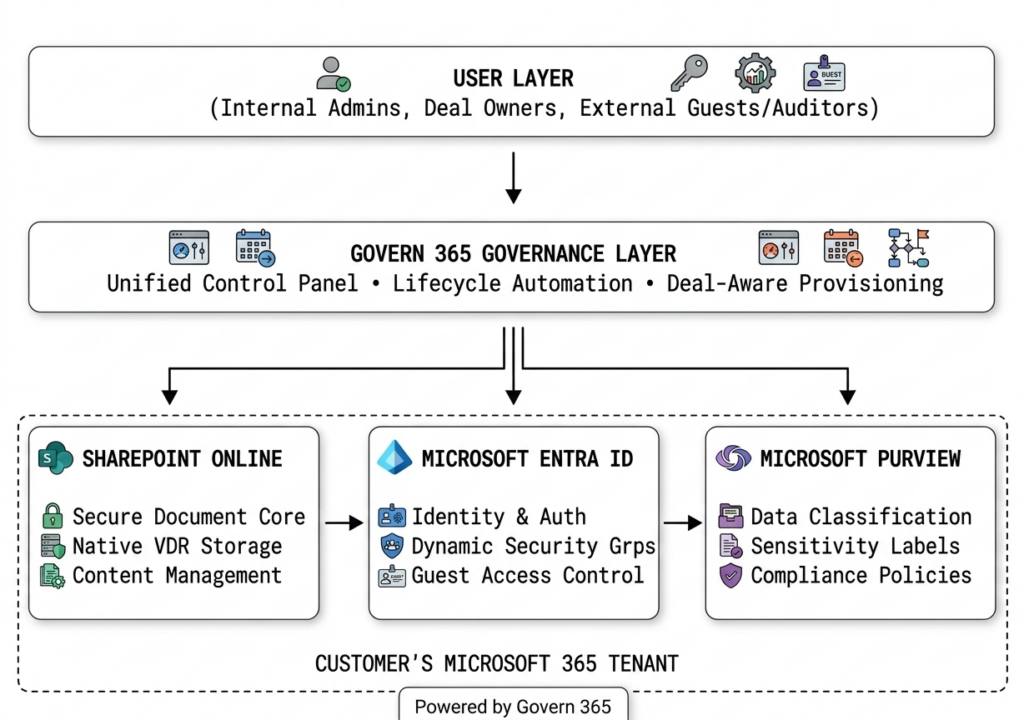
You add a governance and workflow layer on top of SharePoint Online. Govern 365 is built for exactly this. It provisions a secure, fully-configured deal workspace inside your existing Microsoft 365 tenant, then closes the eight gaps above with native integrations to SharePoint, Entra ID, and Purview.
What stays the same:
- Data lives in your SharePoint Online tenant, your geo, your compliance boundary
- Identity stays in Entra ID – no separate vendor account store
- Compliance reuses your existing Microsoft Purview policies
- External users authenticate via Entra ID B2B with their own corporate identity – no new accounts to issue, no Microsoft 365 licenses to consume on your side
What changes:
- Deal teams provision a room in minutes from a template, not hours from a blank SharePoint site
- Bidder Q&A, watermarking, NDA enforcement, document numbering, and analytics are inside the room
- Closeout is a state change inside your tenant, not a data migration off a vendor platform
For the longer treatment of how SharePoint and Govern 365 fit together, see the SharePoint as a VDR breakdown and the Microsoft 365 Virtual Data Room overview.
When is SharePoint alone enough?
SharePoint alone, without a governance layer, is appropriate when:
- The document exchange is low volume and low risk
- There is one external party, not many
- You do not need a structured Q&A workflow
- There is no closing record or regulator audit requirement
- Internal compliance is satisfied by the Purview policies you already have in place
If any of those flips – multiple bidders, regulators reviewing the audit trail, due diligence with a hard close – configured SharePoint will not hold up. The cost of one botched deal is materially larger than the cost of the layer that would have prevented it.


Govern 365 is a strong, Microsoft 365 native governance and secure collaboration platform. Overall, it comes close to becoming a contender in the governance and secure collaboration market.
Christopher Dixon
Senior IT Director

Bottom line
SharePoint is not a virtual data room. It is the foundation a Microsoft 365-native VDR is built on. For low-risk collaboration, SharePoint alone is enough. For real M&A, fundraising, audits, or any transaction with multiple external stakeholders and a closing record, SharePoint needs a governed layer on top – one that keeps the data in your tenant rather than moving it to a third-party VDR vendor.
If you already pay for Microsoft 365, the natural answer is to add that layer, not to leave the tenant.
Frequently Asked Questions
No. SharePoint is a Microsoft 365 content collaboration platform, not a purpose-built virtual data room. It can be configured to function as one for small workflows, or upgraded into a true VDR by layering a deal-room governance solution on top.
You can, for small or low-complexity deals with one or two external parties. For competitive multi-bidder M&A auctions, raw SharePoint runs out of capability on structured Q&A, dynamic watermarking, document numbering, and closing bible exports – the moments where deal integrity matters most.
The four most material gaps are a structured Q&A workflow, dynamic per-session watermarking, stable document numbering, and one-click closing-bible export. SharePoint also lacks NDA enforcement, bidder engagement analytics, and lifecycle automation across multiple concurrent deals.
SharePoint Online’s underlying security is enterprise-grade – Entra ID identity, Microsoft Purview, Microsoft Defender, encryption at rest and in transit. The question is not whether SharePoint is secure; it is whether SharePoint is configured for deal workflows. Most security incidents in raw SharePoint VDRs come from permission misconfiguration, not platform weakness.
Not necessarily. A Microsoft 365-native VDR like Govern 365 sits on top of your existing SharePoint, Entra ID, and Purview, so you keep the data, identity, and compliance you already have, and only add the missing deal workflows. You do not need to leave Microsoft 365 to get a true virtual data room.
On its own, the marginal cost of running a small deal in raw SharePoint is effectively zero – it is bundled into your Microsoft 365 subscription. Adding a governance layer like Govern 365 is flat-rate (no per-page, per-user, or archive fees), which is materially cheaper than legacy VDRs while keeping the data in your tenant. See the VDR Switch Calculator to model the comparison.
Ready to turn SharePoint into a real virtual data room?
Request a Demo or run the VDR Switch Calculator to compare flat-rate, tenant-native VDR pricing against your current per-page contract.