Govern 365 for Regulatory Affairs
Controlled, isolated, auditable FDA submission collaboration - inside your own Microsoft 365 tenant
Request a DemoProtect Regulatory Submissions Without Exposing Your IP
Regulatory affairs is your highest-IP export function. Govern that exposure with a controlled, tenant-native workflow: release submission baselines through secure data rooms, manage clarifications in a single governed Q&A channel, and log every interaction for a defensible audit trail. Your design files, clinical data, and technical documentation remain in Microsoft 365 - never in a third-party portal you do not control.Trusted by deal teams & security officers | Audit-ready logs | Role-based access | Fast setup





UPCOMING WEBINAR
OCTOBER 13, 2026 | 10:00 AM PT
M365 VDR – How to Enable Security at Every Stage of the Sensitive Data Lifecycle Inside M365.
The problem: email and file-shares leak your crown jewels
Most RA teams still run submissions out of email and ad hoc folders, and it exposes the most sensitive information the company owns in three ways at once.

Regulatory affairs emails specifications, drawings, test protocols, and draft submissions to a list of labs, CROs, consultants, and contract manufacturers, then spends days chasing reports and answering the same clarifying questions one at a time. Those questions arrive scattered across inboxes, so answers are inconsistent and there is no single record of what version a partner worked from. Test reports and raw data come back as PDFs and email attachments that get hand-assembled into an eSTAR package. There is no reliable record of who received which version of the technical file, who opened it, or what was disclosed and when. And when an FDA inspector or a notified-body auditor asks you to prove document control, the trail is a set of email threads that effectively does not exist.
It is not a discipline problem. Email and shared drives were never built to keep competing partners isolated, to enforce one controlled version, or to produce a tamper-evident log. Regulated submission work needs all three – and the cost of getting it wrong is not a lost deal, it is a warning letter, a delayed clearance, or stolen design IP.

The Workflow: a tenant-native submission process
Govern 365 runs the entire submission as a governed workspace built on SharePoint and Entra ID, organized into three zones that never touch.
Open the room
RA creates a time-boxed data room for the device or submission and assembles the internal zone: regulatory strategy, draft submission, predicate and competitive analysis, and design history. No external party ever sees this zone.
Release the controlled baseline
The shared specs, drawings, and test protocols are published into a controlled package – one version, read-only, dated. Every engaged partner works from the same baseline, so there is never a question of which version a lab tested against.
Isolate partners
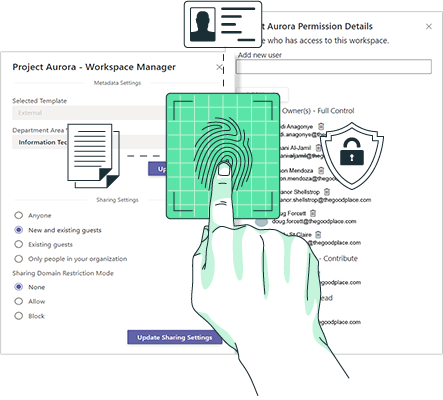
Each lab, CRO, consultant, and contract manufacturer is granted access to its own private room. Permissions ensure no partner can see any other partner – their identity, their data, or their reports. Isolation is enforced by SharePoint and Entra ID, not by manual discipline. The lab never learns the CRO exists.
Notify
Automated emails send each partner a secure, scoped link to their room.
Collect
Test reports, raw data, redlines, and commercial terms come back into each partner’s private room, never a shared folder where competitors could see each other’s work.
Govern Q&A
Partners submit clarifying questions through the Q&A module instead of email. Questions route to the right reviewer or subject-matter expert, and answers are published back into the module with full thread history.
Assemble and submit
The compiled eSTAR / 510(k) package is built in the internal zone and transmitted to the FDA, with an exact, dated record of what was filed.
Respond
FDA deficiency and Additional Information requests are handled in the internal zone; released responses flow back through the controlled package.
Track everything
Govern 365 captures who viewed, who downloaded, who asked what, who answered, and when – across every zone and every partner.
Clear and revoke
When the submission clears, the room is locked and external access is collapsed across links, previews, sync, and caches in a single action. The full history is retained in your tenant as the system of record.
Two sharing patterns, one structure
Regulatory affairs runs two opposite sharing patterns at the same time, and a data room has to serve both without ever letting them cross.
The first is controlled: one baseline, many partners. The same specs, protocols, and the filed submission go to every engaged party, identical and read-only, so version integrity is provable – “every partner worked from the same controlled version, and this is exactly what we filed” is your audit defense. The second is private: one partner, one room. Each partner’s reports, raw data, pricing, and redlines come back into an isolated room that no other partner can see or enumerate. This is where leakage between partners and competitors happens, and it is the heart of the isolation model. The rule that prevents cross-partner leakage is simple: no two external organizations ever share a permission boundary that lists siblings.
Capability mapping: feature to value
| Govern 365 capability | What it does for the submission | Why it matters |
| Tenant-native VDR (SharePoint + Entra ID) | Hosts the technical file in isolated, permissioned rooms | Design and clinical IP stays in your tenant, not a partner portal |
| Three-zone structure (Internal / Controlled / Partner rooms) | Separates strategy, the shared baseline, and per-partner data | Partners never see your strategy or each other |
| Per-partner isolation (Owner / Member / Visitor) | Each lab, CRO, or CMO sees only its own room | Enforces IP isolation automatically |
| Controlled, versioned baseline | One read-only, dated package for all engaged partners | Provable version integrity for FDA and notified-body audits |
| Q&A module | One governed channel for all partner questions and answers | Replaces scattered email; consistent, traceable clarifications |
| Sensitivity labels + AI stance | Carries your enforceable position on whether a partner’s AI may ingest the file | Controls the new prompt-based exfiltration vector |
| Microsoft Purview audit logging | Records views, downloads, questions, answers, timestamps | A defensible, tamper-evident trail for inspections |
| One-action revocation | Collapses all external access at clearance | No lingering links, previews, or cached copies |
You already pay for Microsoft 365. Stop renting your own data back from a third party.
Built for regulated document control
RA does not just need a secure place to share files – it needs to prove control. Because Govern 365 runs inside Microsoft 365, every share, view, version, and download is logged in Microsoft Purview on your retention schedule, supporting the immutable audit trail and electronic-records discipline your 21 CFR Part 11 and ISO 13485 obligations demand. Access is governed by Entra ID, protection by Purview sensitivity labels, and storage by SharePoint – the rigor you need on the systems you already trust, with no second platform to validate, secure, or pay for.
By the Numbers
Why This Is the Highest-Stakes Data RA Handles
Outcomes
One Source of Truth
Every version, question, and answer lives in one governed workspace instead of fragmented inboxes and shared drives.
Provable IP Isolation
Partner access is isolated and controlled through permissions, making protection of sensitive information enforceable and auditable.
Inspection-Ready Process
The submission process becomes inspection-ready and audit-ready, with a complete record of who saw what, who did what, and when.
Faster Cycles, Lower Risk
Submission cycles move faster because teams spend less time chasing partners and reconciling versions, while critical data stays inside Microsoft 365.
Frequently Asked Questions
Yes. Every specification, drawing, test report, and submission document remains inside your Microsoft 365 tenant. No design or clinical data is hosted on a third-party VDR platform, so you keep full control and a single chain of custody.
Yes. External partners access their isolated room through secure guest access with scoped sharing links – no full Microsoft 365 license required – while your data stays fully protected and under your control.
Govern 365 leans on Microsoft Purview for immutable audit logging and on Entra ID for identity, giving you tamper-evident records of every view, version, download, and answer on your own retention schedule – the electronic-records and audit-trail discipline regulated document control requires. Govern 365 is the control layer; your validated processes and policies complete the compliance picture.
No. Each partner is granted a role inside its own private room only. SharePoint security-trims everything else from view, so one lab never even learns that another partner exists – isolation by absence, enforced by permissions rather than manual care.
Purview sensitivity label travels with the document and carries your enforceable position on AI ingestion, addressing the prompt-based exfiltration vector that traditional file-sharing ignores.
Rooms are provisioned from a template in minutes, not weeks. The three zones, per-partner rooms, and permission model are stamped out in one action, so isolation is correct by construction.
Insights | Blog